



Keeping your 3cx updated can be a very valuable thing, apart from major version upgrades, 3cx periodically releases patches that add features and functionality to your system. This is why keeping your Maintenance-licence active, is such a rewarding experience.
To illustrate the extent of improvements gained by this, take a look at the major features on the way in 3cx v15.5 service pack 2
Provision Smartphones via QR code
Installing 3CX on your Android or iPhone can now be done simply by scanning a QR code. Install the latest iOS or Android client, login to your web client and scan the QR code shown in the settings menu. Your smartphone will be automatically configured to allow you to make calls via 3CX from anywhere! Video here

Hotdesking
Hotdesking is now integrated natively into 3CX. Phones can be configured to be ready to hot desk. When this is the case a user can login to the phone and have it instantly provisioned for his/her extension. This includes BLF buttons. Video here.
Streamlined Audio and Video conferencing Setup
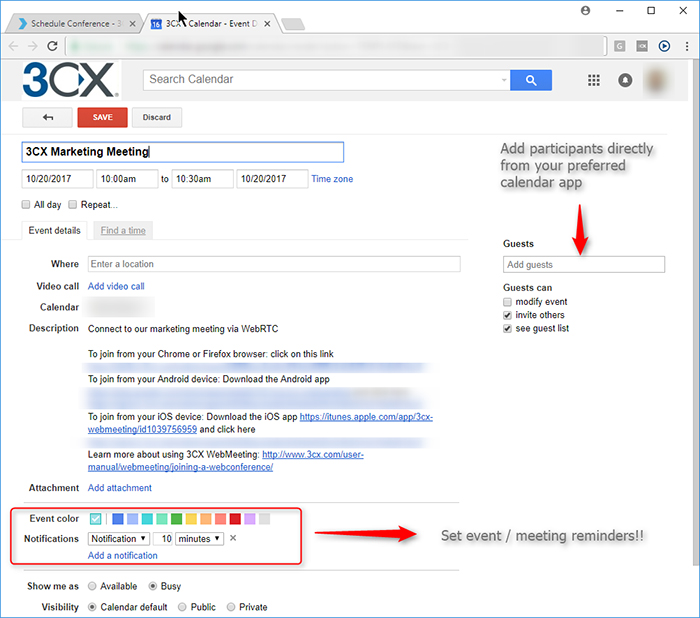
3CX now features a new and instantly familiar scheduled conferencing interface – namely the one included in your calendar app! Scheduling an audio or video conference has never been easier. Simply select the type of conference and click to create the meeting in Google, iCalendar, Outlook or Office 365 and invite your participants from there. Or download the ICS to support almost any calendar app.
Server based CRM Integration
The new CRM integration now works server side with the new web client. Now you can configure your CRM solution at server level and it will work for all of your clients. Out of the box it works with Google, Office 365, Salesforce What’s more, the new integration is based on REST – and makes it easy to support almost any REST API based CRM system out there.
Look Ma – No mail server! 3CX Provides SMTP Account
To further ease the setup process, 3CX now provides a free SMTP account for use with 3CX Phone System. Now you no longer need to “bring your own” and spend time configuring it!
Installation & OS Management Features
Further improvements included in update 2:
- Memory and CPU usage is shown in the services page
- The PBX configuration tool has been simplified and merged with the network configuration tool.
- Time zone, UTF 8 Local and NTP are now configured automatically at installation.
- Let’s Encrypt certificates issue process has been streamlined
- Licensing error messages improved
- Ability to download syslog files from the management console
- Terminal window allows you to do basic OS maintenance without SSH. View video.
- Virt what shows what virtualization is used
Network Quality Monitor

The iOS and Android smartphone clients now also have a Network Quality indicator. If the network quality is low obviously this will impact conversations
Receptionist Features
To make the receptionist’s life easier, we have added a few features specifically for them, notably:
- Ability to set a status for a user
- Ability to set/unset a user to DND
- Ability to clear and assign an extension to another user